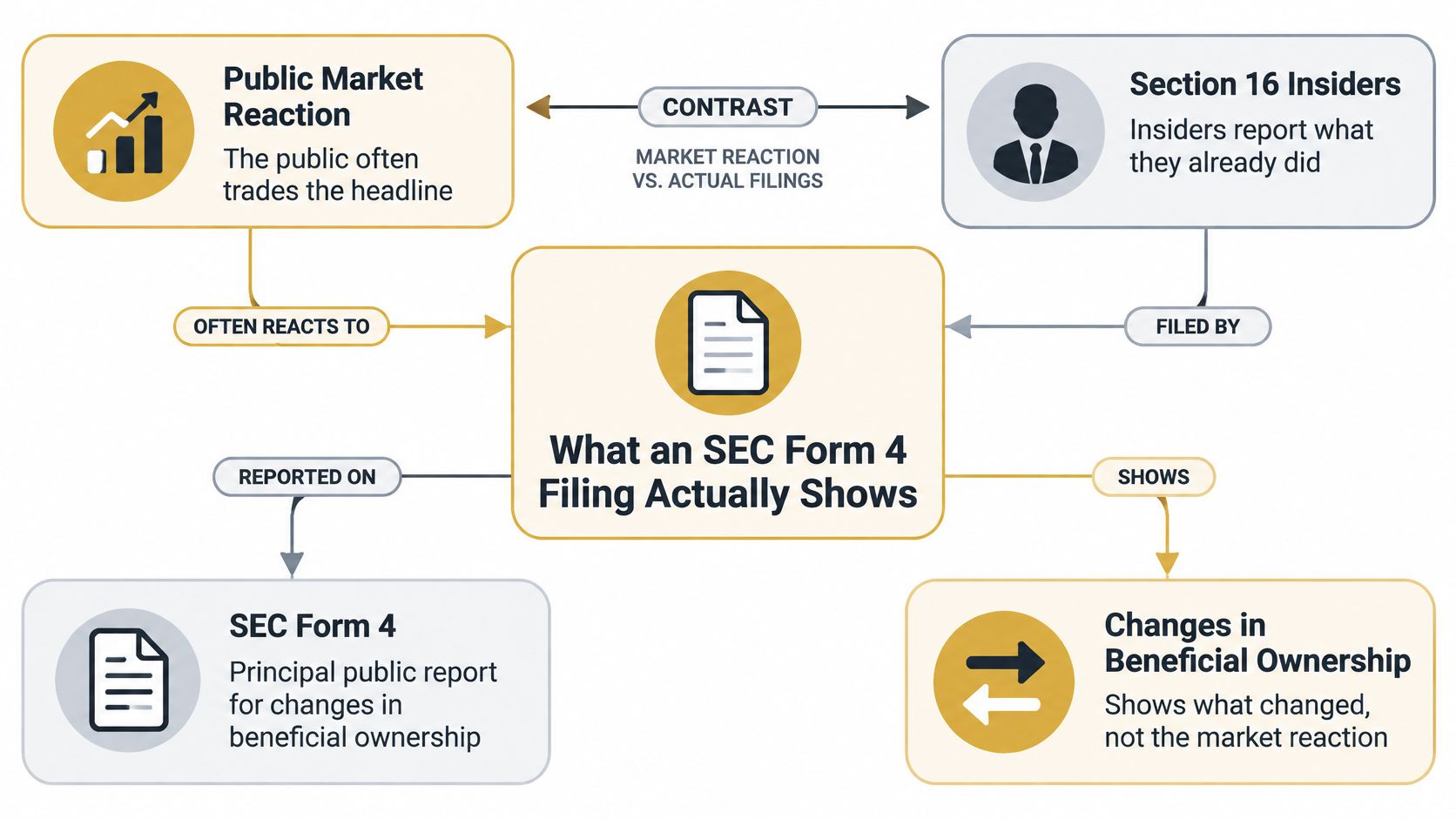
Most advice about SEC Form 4 filings starts with “follow the insiders.” That's too simple. The public often trades the headline while company insiders report what they already did, and a filing can describe compensation, taxes, or a transfer rather than an open-market bet.
The useful question isn't just whether an insider's holdings changed. It's what changed, when the transaction happened, when the filing became public, and what the transaction code and footnotes say. Treat filings as evidence to examine, not instructions to copy.
Table of Contents
- What an SEC Form 4 Filing Actually Shows
- Finding Form 4 Filings on EDGAR
- How to Read Every Box on a Form 4
- Transaction Codes and Patterns That Create False Signals
- Trade Date, Filing Time, and When You Could Act
- Form 4 Compared with Congress and 13F
- Check the Filing Before You Act
What an SEC Form 4 Filing Actually Shows
The public reacts to the news. A Section 16 insider reports a change in beneficial ownership that has already occurred. SEC Form 4 is the principal public report for those changes by covered corporate insiders, including directors, officers, and beneficial owners of more than 10% of a registered class of equity securities, as explained in the SEC's Form 4 instructions.
Say a company officer acquires shares. The Form 4 can show who reported the transaction, that person's relationship to the company, the transaction date and code, the securities acquired or disposed of, the price when applicable, and the resulting ownership. It also indicates whether the securities are held directly or indirectly through an entity or trust. Those details matter: a reported change in ownership doesn't automatically mean the insider chose to make a conventional stock-market trade.
In most cases, the filing is due within two business days after the transaction. The clock starts with the executed transaction, not when a trader spots the filing. That makes Form 4 relatively timely, but it isn't instantaneous. Certain transactions may have special reporting rules or exemptions, and a filing can later be amended.
Form 4 filings appear in a standardized, machine-readable format, which lets investors compare transactions over time instead of relying on a headline or screenshot. But the form doesn't tell you by itself whether a transaction was discretionary, related to compensation or taxes, or conducted under a prearranged plan.
That distinction cuts against the popular “insiders know, so follow them” story. A Form 4 is a historical record, not a live trading tape and not proof that an insider has superior information. To make a useful judgment, first locate the original filing and read the rows and notes, not just the summary.
Finding Form 4 Filings on EDGAR
SEC EDGAR is the free public filing database. A repeatable search is more reliable than a cropped post or an alert that leaves out the filing context.
Search by person or company. Use EDGAR's company or people search. Search an issuer to see filings by its insiders, or search a person to find filings associated with that reporting person across issuers.
Filter for Form 4. The form-type filter removes unrelated filings such as quarterly reports and proxy statements. Keep the form type in view: Form 3 reports initial ownership, while Form 5 is an annual statement that can include transactions eligible for deferred reporting.
Open the filing index and primary document. The index helps you identify the documents attached to that filing. Read the actual Form 4, including its tables and footnotes, rather than relying on a third-party summary.
Check for an amendment. Look for a later Form 4/A, the amendment form. It can correct or change reported shares, price, or transaction code, so the first version you find may not be the complete story.
Save the accession number. The accession number identifies the specific filing. Keep it with your research notes so you can return to the same record or verify a claim later.
An empty search result doesn't prove that no transaction occurred. It means nothing matched the query as entered. Broaden the date range, try a different name spelling, or search by issuer before drawing a conclusion.
EDGAR filings are public and free, so you don't need a paid feed to verify a filing. A feed can save time, but it shouldn't replace checking the underlying document. One Form 4 is a starting point for reading, not a conclusion.
How to Read Every Box on a Form 4
Read the filing in a consistent order. Start with the issuer and reporting person, then work through each transaction row and its footnotes. The point is to understand who acted, what changed, and how the filing describes the change before deciding whether the activity resembles an open-market trade.
| Field | What it reports | How to read it |
|---|---|---|
| Reporting person and relationship | Name plus director, officer, 10% owner, or other | Role tells you who acted, not why |
| Transaction date | Date the transaction was executed | Not the filing date or the day you found it |
| Transaction code | SEC code for the type of change | Don't assume P or S until you read the code |
| Shares and A or D | Number acquired or disposed | Size needs the code and footnotes beside it |
| Price | Price per share when a price applies | A blank price means you need the code and notes before inferring a market trade |
| Ownership form D or I | Direct holding or indirect holding via trust or entity | I requires the footnote that names the holder |
| Shares owned after | Beneficial ownership following that row | Compare with the prior row, not with a headline |
| Footnotes and remarks | Exemptions, plans, tax shares, gifts, amendments | Read these before calling the row a buy or a sell |
Start with the reporting person and dates
Check the issuer name and ticker, then identify the reporting person and their relationship to the company. A director, officer, and holder of more than 10% are different kinds of insiders; the role tells you who filed, but it doesn't explain the purpose of a transaction.
Keep the transaction date separate from the filing date. The transaction date identifies when the reported change occurred. The filing date tells you when the disclosure was submitted, and the time you discover it may be later still.
Read the tables row by row
Table I covers non-derivative securities, such as common shares. For each row, read the transaction code, number of shares, price if reported, whether securities were acquired or disposed of, and resulting beneficial ownership. A Form 4 can contain several rows, and each row needs its own interpretation.
The ownership marker D means direct ownership. I means indirect ownership, such as securities held through a trust or entity. Follow the footnote to identify the indirect holder and understand the reported relationship rather than assuming the shares sit in the insider's personal account.
Open Table II when the transaction involves an option, restricted unit, or another derivative security. An option exercise, for example, may appear as a derivative-security transaction and also produce a related Table I entry for the underlying shares. Read both rows together.
Practical rule: If the price is blank, the code isn't P or S, or a footnote mentions a plan, gift, tax shares, or an issuer transfer, don't call it an open-market bet until the details support that reading.
Transaction Codes and Patterns That Create False Signals
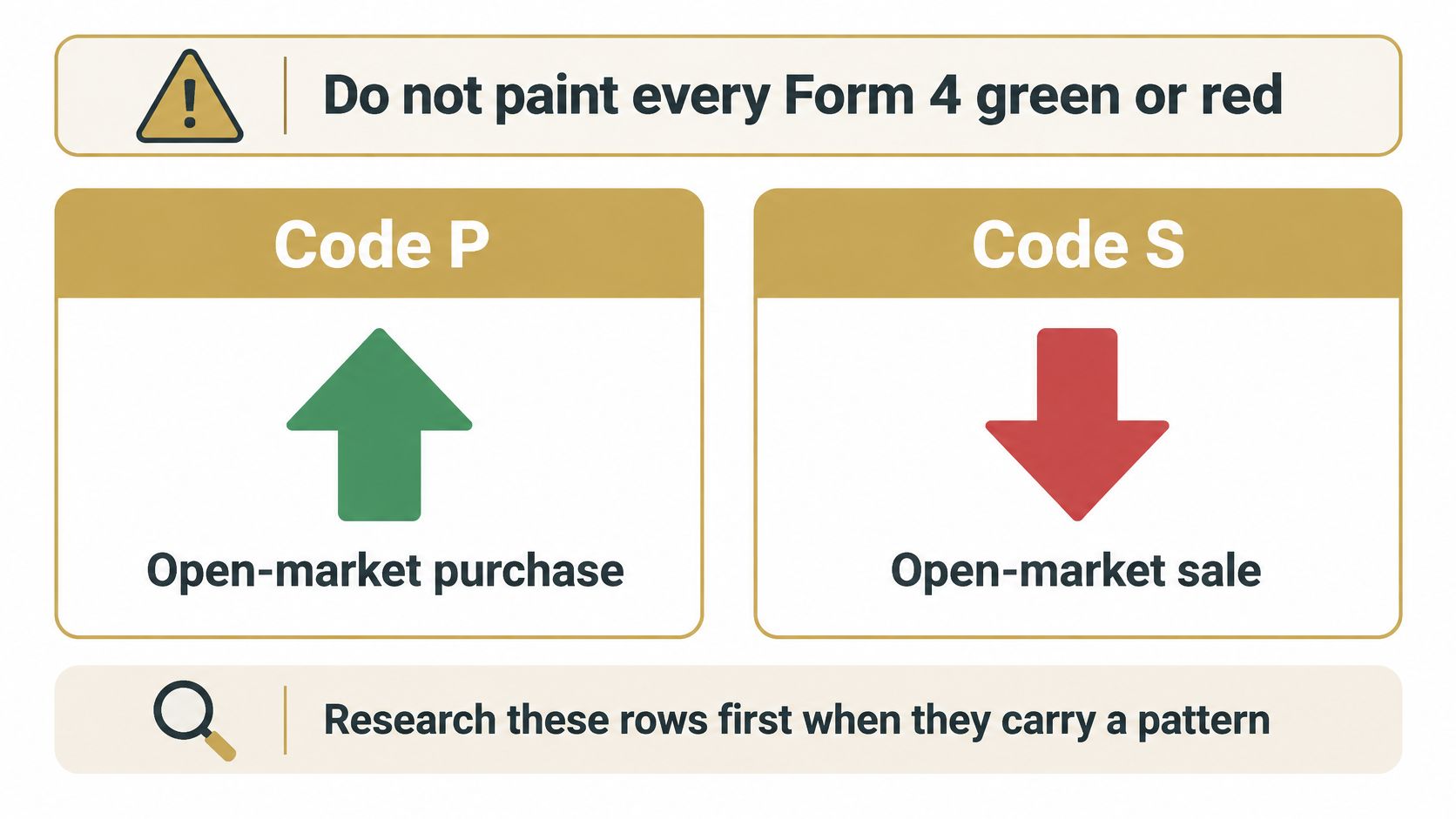
The common mistake is painting every Form 4 green or red. Code P generally marks an open-market purchase, and code S an open-market sale. Those are the first rows to investigate when the price, ownership details, and footnotes fit. Other codes can describe changes in ownership without representing an ordinary buy or sell.
| Code | Typical meaning | Treat as open-market? |
|---|---|---|
| P | Purchase of securities | Yes, if price and footnotes agree |
| S | Sale of securities | Yes, if price and footnotes agree |
| A | Grant, award, or other acquisition | No, usually compensation |
| M | Exercise or conversion of a derivative | No, often paired with another row |
| F | Tax withholding or exercise-price payment | No, shares are surrendered |
| G | Bona fide gift | No |
| C | Conversion of a derivative security | No |
| J | Other transaction, explained in a footnote | Only if the footnote says so |
Compare the fast read with the careful read
| Wrong read | Better read |
|---|---|
| “The share count rose, so the insider bought stock.” | Check whether the code is P, and whether the price and notes support an open-market purchase. |
| “The insider disposed of shares, so they sold into the market.” | Check for F, which can describe shares withheld for tax or exercise-price payment, rather than a market sale. |
| “This filing has two negative-looking rows, so the signal is strongly bearish.” | Read the rows together. An M exercise and F withholding can describe connected events, not two independent open-market trades. |
| “An award adds to holdings, so count it as a purchase.” | Code A can describe a grant or award. Treat it as compensation context unless the filing supports a different interpretation. |
Say an officer reports a P transaction at a stated price, with direct ownership marked D and a higher post-transaction balance. That's a clearer starting point for research than a grant or withholding entry. Still verify the officer's role, transaction date, filing timing, and footnotes. If a footnote identifies a Rule 10b5-1 plan, that's relevant context: the transaction may have been prearranged. And even a genuine purchase doesn't tell you whether its size is meaningful relative to the officer's finances or existing holdings.
Now suppose the same officer later reports A and F transactions with no open-market price. Adding those shares to a “buy” tally would mix a possible award and a share withholding event with a market purchase. That can make a tracker's summary look more bullish than the underlying activity warrants.
The SEC's Form 4 data guide emphasizes the need to preserve footnotes and amendments, especially for code J, which covers transactions not otherwise classified and requires explanatory text. A careful reading or data process keeps transaction date, shares, price, ownership form, and post-transaction holdings alongside the explanation.
The practical filter is simple: start with P and S rows, then verify their price, ownership form, and footnotes. Treat A, M, F, G, C, and J as context until the filing shows why a row should be interpreted differently. A code is a label for the transaction, not a trade thesis.
Trade Date, Filing Time, and When You Could Act
A useful filing history keeps four clocks separate:
- Transaction date: When the reported change happened.
- Filing date: When the report was submitted.
- SEC acceptance time: When EDGAR received and accepted the filing.
- Ingestion time: When a data service captured it.
Those timestamps answer different questions. A backtest that assumes investors could act at the transaction-date closing price treats private activity as though it were already public. That can exaggerate how tradable a filing-based strategy would have been.
The electronic record made systematic analysis practical. The SEC's EDGAR access guidance says that Forms 3, 4, and 5 filed on or after June 30, 2003 were required to be submitted electronically, subject to applicable exceptions. The resulting machine-readable history supports comparisons, but analysts still need to distinguish the filing's timestamps rather than collapse them into a single “disclosure date.”
EDGAR generally accepts filings Monday through Friday from 6:00 a.m. to 10:00 p.m. Eastern Time. For ownership forms, a submission beginning after 10:00 p.m. is disseminated on the next business day, so a late acceptance stamp and the public dissemination date can differ. A backtest that ignores that rule may grant itself access before the information was disseminated.
Amendments add another timestamp to track. A later correction can change the reported shares, price, or code, so preserve the amendment date alongside the original record. A late, amended, or after-hours filing remains useful as history. It doesn't mean you could have traded at the insider's price.
Form 4 Compared with Congress and 13F
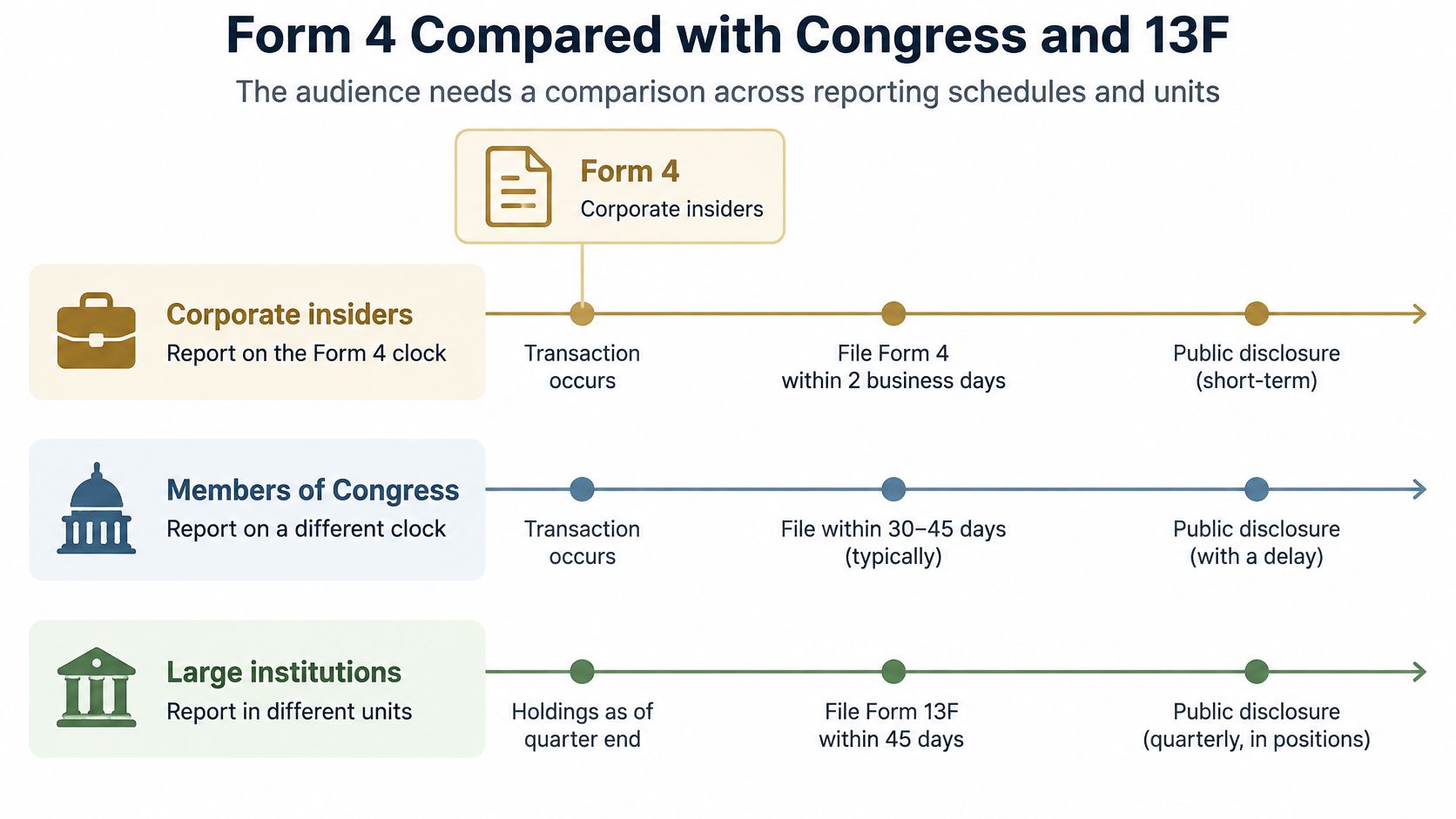
Corporate insiders, members of Congress, and large institutions report on different schedules and in different units. The table captures the practical differences; the details that matter most are how stale a disclosure may be and how precisely it describes the amount.
| Source | Who reports | When the public sees it | How amounts appear | What it is not |
|---|---|---|---|---|
| SEC Form 4 | Directors, officers, and greater-than-10% holders | Usually within 2 business days of the trade | Exact shares and a price when one applies | A live tape or proof of an information edge |
| Senate STOCK Act PTR | Senators for covered trades over $1,000 | Within 30 days of notice, no later than 45 days after the trade | Dollar ranges, not an exact size | A same-day political trade alert |
| Form 13F | Institutions with at least $100 million in 13(f) securities | Generally within 45 days after quarter-end | Quarter-end shares and market value | A record of every buy and sell |
Congressional disclosures are historical, not live
Under the STOCK Act framework, a senator's Periodic Transaction Report, or PTR, covers certain purchases, sales, or exchanges above the reporting threshold. The Senate Ethics Committee's financial-disclosure instructions state that a PTR is due within 30 days after the filer receives written notification, but no later than 45 days after the transaction, even if the filer didn't know it had happened.
Reported amounts appear in prescribed dollar ranges, not as exact transaction values. A range midpoint isn't the politician's actual position size, and the reporting threshold doesn't mean every reported position is worth more than that threshold. The public may be looking at a trade from several weeks earlier. House disclosures also follow the STOCK Act's delayed, ranged-reporting approach, so check the official House or Senate disclosure site instead of relying on a social-media screenshot.
Form 13F is a snapshot, not a trading tape
A Form 13F reports certain institutional holdings, not every asset or each trade as it happens. It can show reported holdings, share counts, and market values for covered securities, but a manager may have changed or closed a position before the public sees the quarter-end report. Assets outside the reportable 13(f) universe may not appear.
Policy and legislation can move sectors by changing expected rules, costs, funding, or demand. But a politician's disclosure, an insider filing, or a large institution's reported holdings doesn't tell you on its own which firms will benefit or how much of a policy change the market has already priced in. A cluster across these sources is context to investigate, not a reason by itself to buy or sell a named stock.
Check the Filing Before You Act
Use a short research routine to keep a filing from turning into a trade instruction:
Open the original Form 4 on EDGAR. Read the code, price, ownership form, and footnotes. Don't rely on a headline that reduces multiple rows to a single buy or sell.
Write down the separate timestamps. Record the transaction date, filing date, acceptance time, and when the data source captured the filing. That shows what was knowable and when.
Separate market trades from other ownership changes. Grants, exercises, gifts, and tax withholding aren't automatically open-market trades. Look for the code and notes that establish what happened.
Verify political disclosures at the source. If a congressional PTR is part of the story, check the House or Senate disclosure site and treat its dollar range as potentially up to 45 days old.
Treat a whale claim from 13F as a snapshot. The reported holdings describe a point in time, not every later trade or position change.
Write down what would disprove your interpretation. For example, a footnote showing that a supposed purchase was an award would weaken a buy-signal reading. Make that check before looking for a chart pattern that confirms your hunch.
For readers who want to compare disclosures without switching between source types, TradeLikeInsiders brings together congressional disclosures, Form 4 insider filings, and whale-flow context. Those congressional and insider disclosures are delayed, not real-time trades, so source timestamps still matter.
This content is for informational purposes only and is not financial advice. Do your own research.
HeliosNet LLC offers TradeLikeInsiders, which brings congressional disclosures, SEC Form 4 filings, and on-chain whale flow together as research context. Use the platform to organize signals and check their timing, then visit TradeLikeInsiders to explore the service.